I am generating a temp file in my WCF and wanted to store in a Temp folder inside my WCF.
HTTPContext does not apply for WCF, so we can't use that to get the base directory
Environment.CurrentDirectory => Will provide you the debug/bin directory
AppDomain.CurrentDomain.BaseDirectory => Will provide you the debug/bin directory as well.
System.Web.Hosting.HostingEnvironment.ApplicationPhysicalPath => Will provide you the Application base directory.
Note that, System.Web.Hosting.HostingEnvironment.ApplicationPhysicalPath will work only if you host the WCF Service as Web application..
If you host the WCF Service from console, it will always return null.
Thursday, June 11, 2015


Wednesday, June 10, 2015
HTTP could not register URL
I was trying to run a service with a non admin user (rmanni), and when I start the service, I got the error
To solve the issue Microsoft said, I need to add the url using netsh command as mentioned here
This command solved it for me
netsh http add urlacl url=http://+:8080/MyService user=myDomain\rmanni
HTTP could not register URL http://+:8080/MyService/. Your process does not have access rights to this namespace
To solve the issue Microsoft said, I need to add the url using netsh command as mentioned here
This command solved it for me
netsh http add urlacl url=http://+:8080/MyService user=myDomain\rmanni
Wednesday, March 11, 2015
Oracle: Reset SYS Password
Follow this exercise only if you forgot both SYS and SYSTEM password.
This is not the utility to renew the current password
If you forget or lost both SYS and SYSTEM password, you can reset them without logging in to the database.
Here is a cool utility to reset SYS and SYSTEM password, if you ever loose or forget the passwords for these account.
This is tested in Windows box only ( orapwd should work in Unix too)
---------------------------------------------------------------------
1) Go to services ( start -> Run->Services.msc)
2) Stop all Oracle services.
3) Find PWDxxxx.ora file. It is usually located in the Oracle\product\11.x\db_x\database.
xxxx stands for your Oracle SID. For example, if you database is called ORCL, then the file will be PWDorcl.ora
4) Back up the existing file (just rename the file).
5) Generate new PWDxxxx.ora file using orapwd utility.
6) Go to command prompt, type
ORAPWD file=path_to_the_PWDxxx.ora_file password=zzzz
zzzz will the new password for both SYS and SYSTEM account
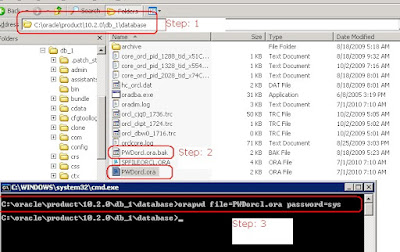
7) Now you will see a new PWDxxx.ora file generated.
8) Restart your Oracle service
9) You should be able to connect to the database with the new password.
This is not the utility to renew the current password
IF you forgot SYS and SYSTEM password in Oracle
Here is a cool utility to reset SYS and SYSTEM password, if you ever loose or forget the passwords for these account.
This is tested in Windows box only ( orapwd should work in Unix too)
---------------------------------------------------------------------
1) Go to services ( start -> Run->Services.msc)
2) Stop all Oracle services.
3) Find PWDxxxx.ora file. It is usually located in the Oracle\product\11.x\db_x\database.
xxxx stands for your Oracle SID. For example, if you database is called ORCL, then the file will be PWDorcl.ora
4) Back up the existing file (just rename the file).
5) Generate new PWDxxxx.ora file using orapwd utility.
6) Go to command prompt, type
ORAPWD file=path_to_the_PWDxxx.ora_file password=zzzz
zzzz will the new password for both SYS and SYSTEM account

7) Now you will see a new PWDxxx.ora file generated.
8) Restart your Oracle service
9) You should be able to connect to the database with the new password.
Saturday, March 7, 2015
android damaged sd card
My phone crashed while loading a game, and upon reboot it said "Damaged SD card", consider rebooting it.
When I connected my SD card to my laptop (via a cardreader/SD Adapter), It was able to read all files, so the SD card wasn't really damaged.
I ran the following command via command prompt, and it fixed it
chkdsk /x /f <sd card drive>
/x stands for "Forces the volume to dismount first if necessary. All opened handles to the volume would then be invalid"
/f stands for "Fixes errors on the disk."

When I connected my SD card to my laptop (via a cardreader/SD Adapter), It was able to read all files, so the SD card wasn't really damaged.
I ran the following command via command prompt, and it fixed it
chkdsk /x /f <sd card drive>
/x stands for "Forces the volume to dismount first if necessary. All opened handles to the volume would then be invalid"
/f stands for "Fixes errors on the disk."
Monday, February 9, 2015

Subscribe to:
Posts (Atom)